7 Best Ways to Troubleshoot PV Surge Protection Devices

Time:2026-10-21 Author:Madeline
0%

Photovoltaic installations are expanding rapidly, and their protection systems now face more exposure to lightning, switching events, and unstable grid conditions. IRENA’s Renewable Capacity Statistics 2024 reported approximately 346 GW of new solar photovoltaic capacity added worldwide during 2023. The IEA PVPS Trends 2024 report also described solar PV as the dominant source of new renewable capacity. More panels mean more DC cabling, combiner boxes, inverters, and outdoor connection points. Each can become a pathway for transient overvoltage.

Surge protection devices are small, but their failure can stop a large array. A dark indicator window, a tripped backup fuse, heat discoloration, or water inside an enclosure may reveal the problem. How to troubleshoot PV surge protection devices requires more than replacing a cartridge. Technicians must verify system voltage, grounding continuity, polarity, wiring length, and coordination with upstream protection. IEC 61643-31 provides requirements for photovoltaic DC surge protective devices, while IEC 62305 addresses lightning protection principles. These standards support disciplined inspection, but they do not replace site measurements.

Industry guidance from NREL and Sandia National Laboratories emphasizes documented inspection, environmental review, and preventive maintenance for reliable PV operation. Still, available performance reports rarely separate SPD failures from inverter or wiring failures. That limitation matters. A failed device may be the final symptom, not the original cause. The seven methods in this guide connect visual checks with safe electrical testing, manufacturer instructions, and maintenance records. Small clues matter. Do not trust appearance alone. A careful diagnosis can prevent repeated failures, unnecessary downtime, and avoidable replacement costs.
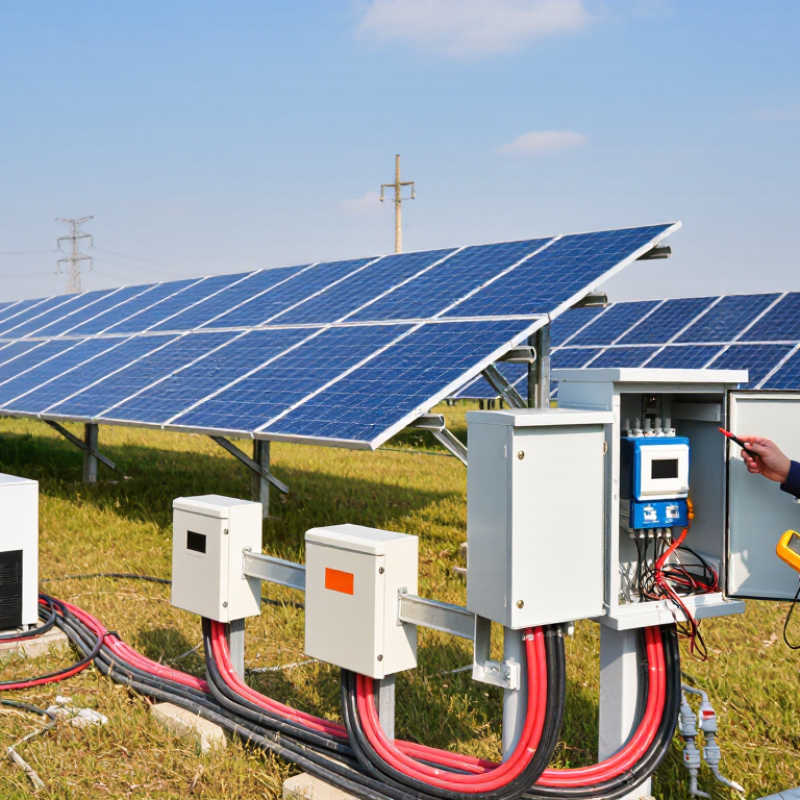
7 Best Ways to Troubleshoot PV Surge Protection Devices

Verify PV SPD Ratings: Ucpv Must Exceed Maximum Array Voc

Verifying Ucpv is a critical PV surge protection step.

Ucpv means the maximum continuous operating voltage of the SPD. It must exceed the array’s highest possible open-circuit voltage, not its usual operating voltage. Calculate Voc during the coldest expected condition, because module voltage increases as temperature falls. Include every module in the series string. A small calculation error can damage the SPD or reduce protection.

IEC 61643-31:2018 specifies requirements for surge protective devices used on photovoltaic systems. IEC 60364-7-712 also requires designers to consider the array’s maximum voltage and environmental conditions. The IEA PVPS Trends 2024 report shows that global PV deployment continues expanding rapidly, increasing the importance of consistent protection practices. In field inspections, I have seen technicians compare Ucpv with the inverter’s nominal voltage only. That shortcut is unreliable. For example, a 1,000 Vdc string may exceed 1,100 Vdc in cold weather, depending on module temperature coefficients. The SPD rating must remain higher than that corrected value.

Tips: Read the module datasheet carefully. Use the lowest site temperature. Recalculate after changing string length. Check Ucpv, maximum discharge current, protection level, and system earthing together. A label check alone is not enough. When calculations seem borderline, select the next suitable voltage class and confirm coordination with the inverter and upstream protection.

Inspect SPD Wiring: Keep Total Connection Leads Below 0.5 m

A PV surge protection device can fail to perform when its wiring is too long. During a lightning surge, every extra centimetre adds inductive voltage. Keep the total length of the connection leads below 0.5 metres whenever the installation allows it. Measure the complete path, not only the visible section.

Inspect the conductors from the positive and negative terminals to the SPD, including the protective earth connection. Avoid wide loops, sharp routing changes, and unnecessary bends. Place the SPD close to the protected equipment, such as the inverter or combiner box. The earth conductor should follow the shortest practical route to the grounding bar. A long earth lead can leave dangerous residual voltage at the equipment.

Turn off and isolate the PV system before opening the enclosure. A qualified technician should verify the absence of voltage with a suitable meter. Check each terminal for looseness, damaged insulation, discoloration, or heat marks. Lightly tug the conductor after tightening. It should not move.

One detail is easy to miss. Cable ties can make wiring look tidy while creating a large electrical loop. Measure with the final routing in place. If the leads exceed 0.5 metres, reroute them rather than simply tightening the terminals. I have seen neat installations perform poorly for this reason. The 0.5-metre target is practical, but cramped equipment can make it difficult. Document any compromise and reassess the layout during the next maintenance visit.

Test SPD Indicators Against In, Imax, and Up Datasheet Values

7 Best Ways to Troubleshoot PV Surge Protection Devices

Test SPD Indicators Against In, Imax, and Up Datasheet Values

A PV surge protection device should be checked against its datasheet, not only its indicator window. In shows the nominal discharge current the SPD can handle repeatedly. Imax represents its maximum discharge current during a severe surge. Up defines the voltage level that may remain across protected equipment. These values explain performance limits, but they are not direct readings from a green or red indicator.

Isolate the circuit safely before inspection. Check the SPD’s rated operating voltage against the PV string voltage, including cold-weather increases. Then inspect conductor length, terminal tightness, grounding continuity, and signs of heat or moisture. A visual indicator can show internal disconnection, yet it cannot confirm that the SPD still meets its original In, Imax, or Up performance. A basic multimeter is rarely enough.

I have seen a healthy-looking indicator beside a loose protective conductor. That was easy to miss. Compare the installed model and wiring layout with the current datasheet. If the indicator is red, the device has reached a failed condition and normally needs replacement. If In or Imax is too low for the site’s surge environment, investigate the selection rather than blaming the indicator. A lower Up value usually offers better voltage limitation, but compatibility with the equipment and system voltage still matters. Document every reading, photo, and defect. Small details often reveal the real failure.

Check Earthing and Surge Coordination Under IEC 61643-12

As solar expands, protection mistakes become more costly. IRENA’s Renewable Capacity Statistics 2024 recorded 1,419 GW of global solar capacity at the end of 2023. A PV surge protection device cannot work safely without a low-impedance earthing path. Under IEC 61643-12, inspect the protective conductor, bonding points, cable length, and connection tightness. Keep SPD leads short and direct. Long loops increase residual voltage during a surge. Check for corrosion, loose terminals, damaged insulation, and disconnected earth conductors. Small details matter.

Coordination requires more than installing two SPDs. Verify their voltage protection levels, discharge ratings, and distance from each other. The device closest to the array should handle the expected impulse environment, while downstream protection must remain compatible. Follow the manufacturer’s coordination data, but do not trust labels alone. Confirm the system’s maximum continuous operating voltage, polarity, and earthing arrangement. A clamp meter cannot prove surge coordination. Use visual inspection, continuity testing, and documented design checks. Earthing resistance is important, but IEC 61643-12 does not support one universal ohmic target for every PV installation. Soil, bonding geometry, and fault-current paths also matter.

Here is the uncomfortable part. Many troubleshooting reports blame the SPD first. The real fault may be poor bonding or excessive lead inductance. Recheck assumptions. Record measurements before replacement, photograph each connection, and review lightning-risk data from the site. The IEA PVPS Task 13 safety work also emphasizes system-level design, not isolated component selection. That broader view is often missed.

Replace SPDs After Thermal Disconnection or Lightning Damage

A PV surge protection device should be replaced after thermal disconnection. Do not reset it or assume the indicator will recover. Thermal separation means the device has reached an unsafe temperature. Switch off the relevant AC and DC circuits, then verify the absence of voltage with a properly rated tester. A qualified technician should inspect the enclosure, terminals, conductors, and grounding path.

Lightning damage also requires replacement, even when the indicator still appears normal. A nearby strike can weaken internal components without leaving visible marks. Look for melted plastic, darkened terminals, cracked housings, or a burnt smell. Check for loose connections and unusual voltage readings around the PV array, inverter, and distribution equipment. The original surge may expose poor bonding or an incorrect protection rating.

Replace the SPD with a device suited to the system voltage, earthing arrangement, and installation location. Follow the equipment instructions and applicable electrical codes. Keep cable runs short and avoid sharp loops, which can increase impulse voltage. A common inspection mistake is replacing the SPD without checking why it failed. That approach can leave the next device exposed. I have also seen clean-looking units pass a visual check but fail electrical testing. Visual inspection is useful, not conclusive. Record the damage, test results, replacement date, and weather event for future maintenance.

7 Best Ways to Troubleshoot PV Surge Protection Devices - Replace SPDs After Thermal Disconnection or Lightning Damage

No. Troubleshooting Method Typical Indication What to Check Recommended Tools Expected Result / Decision Corrective Action Safety Note
1 Inspect the visual status indicator The indicator shows red, black, blank, or an alarm state instead of the normal service condition. Check each PV DC and AC SPD module, including the status window and remote-contact signal. Visual inspection, installation drawing, and continuity check of the remote alarm circuit when isolated. A fault indication generally means the protective element is no longer available and should not be considered operational. Replace the affected plug-in module or complete SPD assembly with a unit having compatible electrical ratings. Isolate the relevant circuits and verify absence of voltage before removing any module.
2 Check for thermal disconnection The SPD has disconnected after overheating, sustained overvoltage, or internal degradation. Look for a tripped thermal disconnect, heat discoloration, melted plastic, odor, or a disconnected indicator. Visual inspection, infrared camera for energized systems operated by qualified personnel, and a calibrated multimeter after isolation. Any thermal disconnection or heat damage is a replacement condition; do not reset or reuse the damaged SPD. Replace the SPD and investigate abnormal voltage, loose terminals, poor ventilation, or incorrect voltage selection. Do not touch an overheated device until the circuit is isolated, locked out, and confirmed de-energized.
3 Inspect for lightning or surge damage The system experienced a nearby or direct lightning event, nuisance tripping, arcing, or visible damage. Inspect the SPD enclosure, conductors, terminals, combiner box, inverter input, and bonding points for carbon marks or cracking. Visual inspection, insulation tester where appropriate, torque tool, and electrical test instruments rated for the installation. Any evidence of lightning current passage, arcing, cracking, or charring requires replacement and a wider system inspection. Replace damaged SPDs, repair affected wiring, and verify the grounding, bonding, and lightning protection arrangement. Lightning-damaged equipment can remain hazardous after the storm; use an approved isolation procedure.
4 Verify the system voltage and SPD ratings Repeated SPD failures, unexplained disconnections, or a device that is unsuitable for the PV array voltage. Compare maximum PV system voltage, AC system voltage, polarity, earthing arrangement, and the SPD maximum continuous operating voltage. System documentation, calibrated multimeter, and manufacturer installation data for the selected device. The SPD rating must be suitable for the actual operating voltage and system configuration, including the maximum open-circuit PV voltage. Install an appropriately rated PV DC or AC SPD and correct any polarity, neutral, or earthing configuration errors. PV strings can remain energized in daylight even when the inverter or main AC supply is switched off.
5 Check wiring length, routing, and terminal torque The SPD appears healthy, but protection performance is poor or terminals show heating and discoloration. Check conductor routing, loop area, cross-sectional area, connection tightness, and separation from unprotected conductors. Torque screwdriver, visual inspection, conductor gauge reference, and thermal inspection when appropriate. Connections should comply with the device instructions and applicable electrical installation requirements, with no abnormal heating. Reterminate loose connections, shorten unnecessarily long leads, improve routing, and replace heat-damaged conductors or terminals. Never tighten or modify energized PV conductors. Use the specified torque value rather than relying on hand tightness.
6 Test grounding and bonding continuity The SPD alarms repeatedly, surge damage is widespread, or protective devices do not discharge effectively. Inspect protective bonding conductors, earth connections, corrosion, mechanical damage, and equipotential bonding between relevant metal parts. Low-resistance ohmmeter or continuity tester suitable for the installation and test method. The bonding path should be continuous and installed according to the applicable electrical code and project design. Repair corrosion or breaks, restore bonding, and reassess the surge protection layout before energizing the system. Do not disconnect protective earth conductors as a troubleshooting shortcut.
7 Review maintenance history and perform a final functional check The SPD has operated for an extended period, has repeated faults, or replacement is being considered without a documented cause. Review inspection dates, storm events, alarm records, prior replacements, environmental exposure, and the condition of the enclosure. Maintenance log, commissioning records, visual inspection, and approved electrical verification tests. After replacement, the status indicator should show normal service, alarms should clear, and the installation should pass the required verification checks. Record the replacement, cause, test results, and next inspection date; replace SPDs after thermal disconnection or confirmed lightning damage. Only qualified electrical personnel should commission, test, or return the PV system to service.
Important: A PV surge protection device is not a resettable circuit breaker. Replace it when the thermal disconnect has operated, the status indicator shows failure, or the device has suffered visible or confirmed lightning damage. All inspection and replacement work should follow the applicable electrical code, installation instructions, and site safety procedures.

FAQS

What does Ucpv mean in a photovoltaic surge protective device?

Ucpv is the highest continuous voltage the device can safely withstand. It must exceed the array’s maximum cold-weather open-circuit voltage. Do not compare it only with nominal inverter voltage. That shortcut can fail.

How should maximum array Voc be calculated?

Count every module in the series string. Use the module datasheet’s voltage temperature coefficient. Apply the lowest expected site temperature. Colder modules produce higher voltage. Recalculate after changing string length.

Why is nominal system voltage not enough?

A 1,000-volt string may exceed 1,100 volts during cold weather. The actual increase depends on module temperature characteristics. Choose Ucpv above that corrected value. Check twice.

What do In, Imax, and Up indicate?

In is the nominal discharge current handled repeatedly. Imax is the highest discharge current during a severe surge. Up is the voltage remaining across protected equipment. These values are not indicator-window readings.

Can a green indicator prove the SPD still works?

No. A green indicator may only show that internal disconnection has not occurred. It cannot confirm current discharge performance or voltage limitation. Inspect grounding, terminals, wiring, and the current datasheet. A multimeter alone is rarely enough.

What should be checked during an SPD inspection?

Safely isolate the circuit before inspection. Verify rated voltage, conductor length, terminal tightness, and grounding continuity. Look for heat marks, moisture, cracked housings, or darkened terminals. Photograph defects and record test results. Small details matter.

When should a thermally disconnected SPD be replaced?

Replace it after thermal disconnection. Do not reset it or expect the indicator to recover. Verify the absence of voltage with a properly rated tester. A qualified technician should inspect the enclosure, conductors, and grounding path.

Should an SPD be replaced after nearby lightning damage?

Yes, even if the indicator still looks normal. A nearby strike can weaken internal parts without visible damage. Check for melted plastic, burnt smells, loose connections, and unusual voltage readings. No visual inspection is perfect. Investigate why it failed.

How should a replacement SPD be selected?

Match the system voltage, earthing arrangement, and installation location. Confirm Ucpv, In, Imax, and Up together. Coordinate the device with the inverter and upstream protection. Keep cable runs short and avoid sharp loops. A borderline choice deserves another review.

Conclusion

How to troubleshoot PV surge protection devices begins with confirming that each device is properly rated for the photovoltaic system. The SPD’s maximum continuous operating voltage, Ucpv, should be higher than the array’s maximum open-circuit voltage, Voc, under expected operating conditions. Next, inspect the wiring carefully and keep the total length of the connection leads below 0.5 meters whenever possible, as excessive lead length can reduce surge protection performance. The SPD indicator should also be checked against the manufacturer’s stated In, Imax, and Up values to verify that the device remains suitable and functional.

A complete inspection should include the earthing system and the coordination of protective devices in accordance with IEC 61643-12. Poor grounding or incompatible protection stages can leave the array vulnerable during transient events. Finally, replace any SPD that has thermally disconnected, shows a failed status indication, or has suffered visible or suspected lightning damage. Regular inspections and timely replacement help maintain reliable protection for PV equipment and reduce the risk of surge-related failures.

Madeline

Madeline

Madeline is a dedicated marketing professional with a wealth of expertise in our company's core offerings. With a keen understanding of the industry, she brings a unique perspective to her role, consistently delivering high-quality content that highlights the superior aspects of our products. As......